Home
Student
Employee
FAQs
Home
Student
Employee
FAQs
home
/
Knowledge Base
/
Student
/
Wireless Network (Wi-Fi)
Category
Knowledge Base
FAQs
Documentation
How can students connect to HBKU Wireless network (WiFi) on their MAC computers?
355 views
1
September 9, 2020
November 4, 2020
mmirza
Connect to HBKU WiFi on MAC
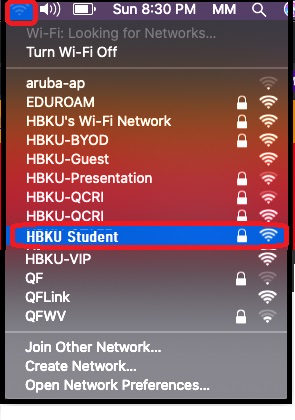
Search for HBKU-Student
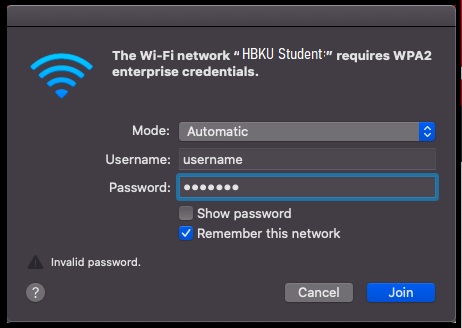
Enter your HBKU email username
Enter your HBKU email password and click ‘Join’ to connect.
Tags:
HBKU Wi-Fi on MAC for Students
How can students connect to HBKU Wireless network (WiFi) on their MAC computers?
wi-fi for students
Was this helpful?
1 Yes
No
Related Articles
How to activate Duo Security two factor authentication?
Using Mediasite Lecture Capture from Canvas
How to submit advisor, project and RAC Member selection form (for CHLS Students only )
How to submit Internal Procurement Request for CSE
How to access AVD through Web
How students can submit a request for campus ID ?
Category
Knowledge Base
FAQs
Documentation